📖 Overview

Multi Tab Rows (MultiTabRows@Merci.chao.uc.js) is a thorough and complete solution for multi-row tabs in Firefox, implemented as a userChrome.js script. Inspired by the classic MultiRowTabLiteforFx.uc.js (Izheil’s and Japanese versions) and the versatile Tab Mix Plus, this brand new project brings modern refinements and improved usability — dedicating the ultimate multi-row tabs experience to you.
🧩 Compatibility
- Works with Firefox latest released and ESR (115, 140, 153) versions.
- Supports Windows and Ubuntu.
🌟 Highlights
📐 Maximized Space Usage
Multi Tab Rows makes the most of your browser’s screen space, extending into the space beneath the window control buttons.

If you prefer a more classic look, you can place the tab bar beneath the navigation toolbar for that good old-fashioned style, and no menu bar or title bar is necessary at all!
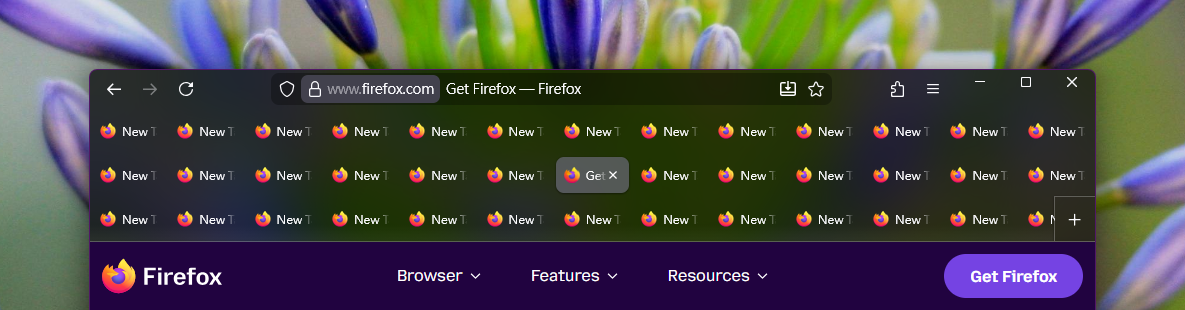
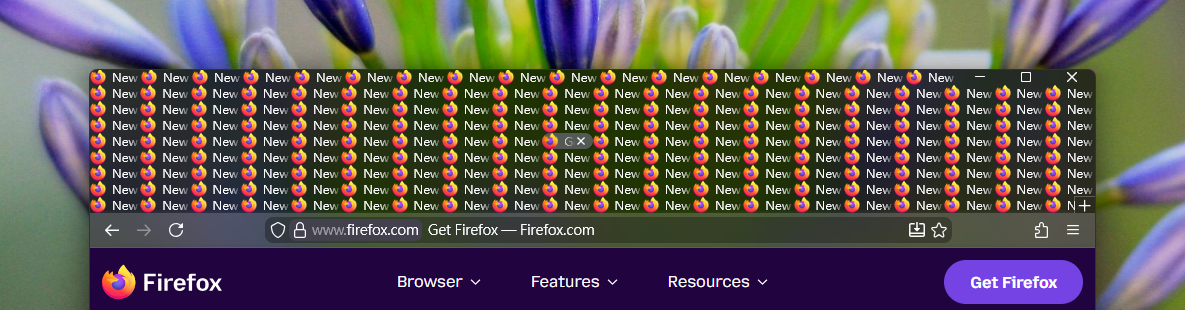
Go compact or go home? No problem. Just make sure to leave some space to breathe, and tune it to the sweet spot between compactness and comfort.
🖱️ Drag & Drop in Motion
Tab management feels effortless with its exclusive drag & drop support. Free from the drop indicator — just smooth and intuitive movement, even in multi-row mode.

🚀 Newest Features Support
Whether you’re using tab groups or working with split views, Multi Tab Rows is fully compatible with Firefox’s latest features. Dragging tabs or split views to group them together works the way it always has.

If you’re not a big fan of tab grouping, you can search for Drag tabs together to create tab groups in Firefox settings and turn it off. It will prevent tabs from being accidentally grouped.
✨ Polished Interactions
Multi Tab Rows refines Firefox’s native tab behavior, fixing glitches and filling in gaps to deliver a smoother, more complete experience. Every interaction feels natural, as if it were built right into Firefox.

🌸 With Heart in Every Detail
Have you noticed that in Firefox you can keep closing a sequence of tabs without ever moving the cursor? It’s one of the thoughtful details that almost all multi‑row tabs implementations overlook. But not Multi Tab Rows. Multi Tab Rows values every nuance and go the extra mile to preserve and recreate these subtle features — all in pursuit of perfection.

📌 Pinned Tabs Grid Layout

Pinned tabs are compact, neatly arranged in a grid, making them easy to access even when the tab bar becomes scrollable.

If you prefer them to behave like normal tabs and scroll away to save space, you can easily turn this feature off.
🛠️ Customizable Preferences

While the default setup is already optimized and ready to use, Multi Tab Rows offers a rich set of options that let you fine-tune everything from tab sizing to layouts and interactions. All changes take effect instantly, with no restart and file modification required. Explore the full list of settings to truly make your browsing experience your own.
🔄 Built-In Updater
Multi Tab Rows ensures you’re always equipped with the latest enhancements and compatibility. There’s no need to worry about sudden breakages or the frustration of hunting for updates after getting a new version of Firefox — one click keeps everything working smoothly.

For those who prefer more control, updates can also be applied manually — or turned off if you want.
🛡️ Reliable Support
Unlike scripts of uncertain origin that have long been neglected, Multi Tab Rows is developed with enduring passion and long-term dedication. Backed by years of experience in Firefox extension development, it continues to evolve with care and expertise.
👤 About the Developer

Since 2006, I’ve created several Firefox extensions, including:
- Personal Menu
- Pick & Save Images
- Movable Firefox Button
- History Submenus II
- Page Title in URL Bar
- Semi-Full Screen
- Float Toolbars in Full Screen
- Mid-Click Restart
(Links above are archived on web.archive.org)
My first extension, Personal Menu, though it was a niche add-on designed for Firefox customization lovers, once reached over 165,000 users at its peak and was translated into 30 languages by volunteers from around the world. It provided a toolbar button with a fully customizable menu, letting you place your most-used items and completely hide the traditional menu bar. This extension debuted in Firefox 1.5 — a full 5 years before Firefox 4 decided to replace the menu bar with an orange button! (By the way, IE7 was still in beta back then, and Chrome wouldn’t show up until two years later.)
I actively maintained Personal Menu for 9 years, and it remained stable afterward. Two of my other extensions were also featured on the official Add-ons for Firefox website.
All of them were tools for UI tweaking, except for Pick & Save Images. Unlike the others, it focused on image grabbing, offered profile-based preference sets with Firefox Sync support, and gave you both easy-to-use and professional filtering features. It also came with a sleek, versatile button that blended seamlessly into Firefox’s UI. I also created a comparison table — an arena to wage a battle against 3 other popular image‑saving extensions for Firefox at that time (including the famous DownThemAll!) — across 24 objective items, ranging from user‑oriented features to deep technical support and handling.
Unfortunately, these extensions didn’t make it through the Quantum era (Firefox 57+), since WebExtensions don’t allow browser UI customization. Still, a number of small UI‑tweaking extensions continue to live on through userChrome.js. Feel free to check out my repository to explore them.
Now, my focus is on Multi Tab Rows, the project I’ve been working on for thousands of hours since 2024. It will continue evolving as long as Firefox allows.
📥 Download & Installation
Please follow the 📓 Notes & Installation Guide to download and set up. Enjoy the best multi-row tabs experience in Firefox today.
The cautions and installation instructions may look a bit long and serious, but that’s just to make sure everything’s clear and safe. Thanks for bearing with me! 🙈
🛟 Help
If you need any help, find bugs, or want to suggest improvements, you’re welcome to sign in to GitHub and post them here at any time! 👋